A Creator's Guide to Crafting the Perfect Adult AI Image
Learn to create, refine, and monetize a professional adult AI image. This guide provides actionable steps for using AI tools responsibly and effectively.
So, you're ready to create your own adult AI images. It's all about using your imagination to dream up unique characters and scenes, then letting an AI platform like CreateInfluencers bring them to life. Whether you're making visuals for a personal project or aiming to monetize on platforms like Fanvue and OnlyFans, it all starts with a few simple steps.
Your First Steps in Adult AI Image Creation
Jumping into AI-generated adult content can feel like a big leap, but the tools available today have made it incredibly accessible. You can forget about needing to be a tech wizard. The real work is creative, not technical. These platforms are built to get out of your way so you can focus on the fun part: creating.
The first thing you’ll want to do is establish your digital persona. While you could try to build a character from scratch, I've found the most effective way to start is by using a single reference photo. This one small step is the secret to keeping your AI influencer looking consistent from one image to the next.
The Power of a Single Selfie
Honestly, the fastest way to create a memorable AI character is to start with a selfie. This doesn't mean your actual face is going to be plastered everywhere. Instead, the AI just uses it as a structural guide—a blueprint for your character's facial features. On CreateInfluencers, this is literally a one-click deal. You upload a clear photo, and the platform instantly generates a base character from it.
Using this method right from the get-go solves the biggest headache in AI image creation: consistency. Your character will have the same fundamental look in every picture, whether you're creating a steamy boudoir shot or a casual "day in the life" post.
The goal is to build a believable persona. Using a consistent facial reference from the very beginning is the single most important step for creating an AI influencer that your audience can connect with over time.
Getting Comfortable with the Tools
Once your character's face is locked in, the creative magic happens in a really straightforward interface. You don't need any special skills to get started. The entire process boils down to a few key actions:
- Pick Your Character: Just select the AI persona you created from your selfie.
- Write Your Prompt: This is where you describe the scene, what they're wearing, the lighting—everything.
- Generate: Hit the button and watch your idea become an image.
This simple setup lets you experiment without getting lost in confusing technical menus. As you start out, it helps to understand the bigger picture. This comprehensive guide to AI social media content creation gives you a great overview of how AI is being used across social media, which can spark some ideas for your own influencer. It's also worth seeing what other tools are out there; our guide to the best AI image generators breaks down the different options available. Ultimately, these first few steps are all about building your confidence and seeing just how easily you can turn a simple idea into a stunning adult AI image.
Defining Your AI Persona and Signature Style
Once you’re past the basic setup, this is where the real fun begins. Now, we get to breathe life into your AI influencer—giving them a personality, a signature look, and a unique vibe that sets them apart. A strong persona is what separates a random gallery of pictures from a compelling brand that people actually want to follow and support.
It all starts with your prompts. Think of yourself as a director on a photoshoot. You’re in charge, and your words are the script that dictates everything from the mood to the tiniest details. If your instructions are vague, you'll get generic, forgettable results. Specificity is your best friend here.
A solid prompt should feel like you're setting up a real-world shoot. You need to define who your character is, where they are, what they’re doing, and what the final shot should look like.
Mastering the Art of the Prompt
A powerful prompt is a detailed story, not just a simple command. Instead of typing "woman in lingerie," you need to paint a complete picture for the AI.
Let's try that again. A much more effective prompt would be something like, "A boudoir photoshoot of a confident woman with long, wavy auburn hair and green eyes, wearing intricate black lace lingerie, posing on a velvet chaise lounge in a dimly lit, luxurious bedroom with silk sheets."
See the difference? That level of detail gives the AI a clear roadmap, leading to a much richer and more intentional image. When you're just starting, breaking your prompts into these categories is a game-changer:
- Subject: Get specific about your character. What's their hair color and style? Eye color? Body type? Any unique facial features?
- Attire: Don't just say "dress." Say "a red silk slip dress" or "black leather bodysuit." Mention materials, colors, and styles.
- Setting: Where is this happening? A modern downtown loft? A sun-drenched beach at golden hour? A moody, neon-lit cyberpunk city?
- Action & Pose: What is your character doing? Are they looking seductively at the camera, stretching languidly, or caught in a candid, laughing moment?
- Lighting & Mood: This is huge for atmosphere. Is it the soft, hazy light of early morning, harsh studio lighting, or the warm, flickering glow of candlelight?
- Artistic Style: What aesthetic are you aiming for? Photorealistic, cinematic, a dreamy painting, or maybe a vintage polaroid look?
Getting started is refreshingly simple. The platform boils it down to three core actions: upload your reference selfie, create your character model in one click, and then start generating images.
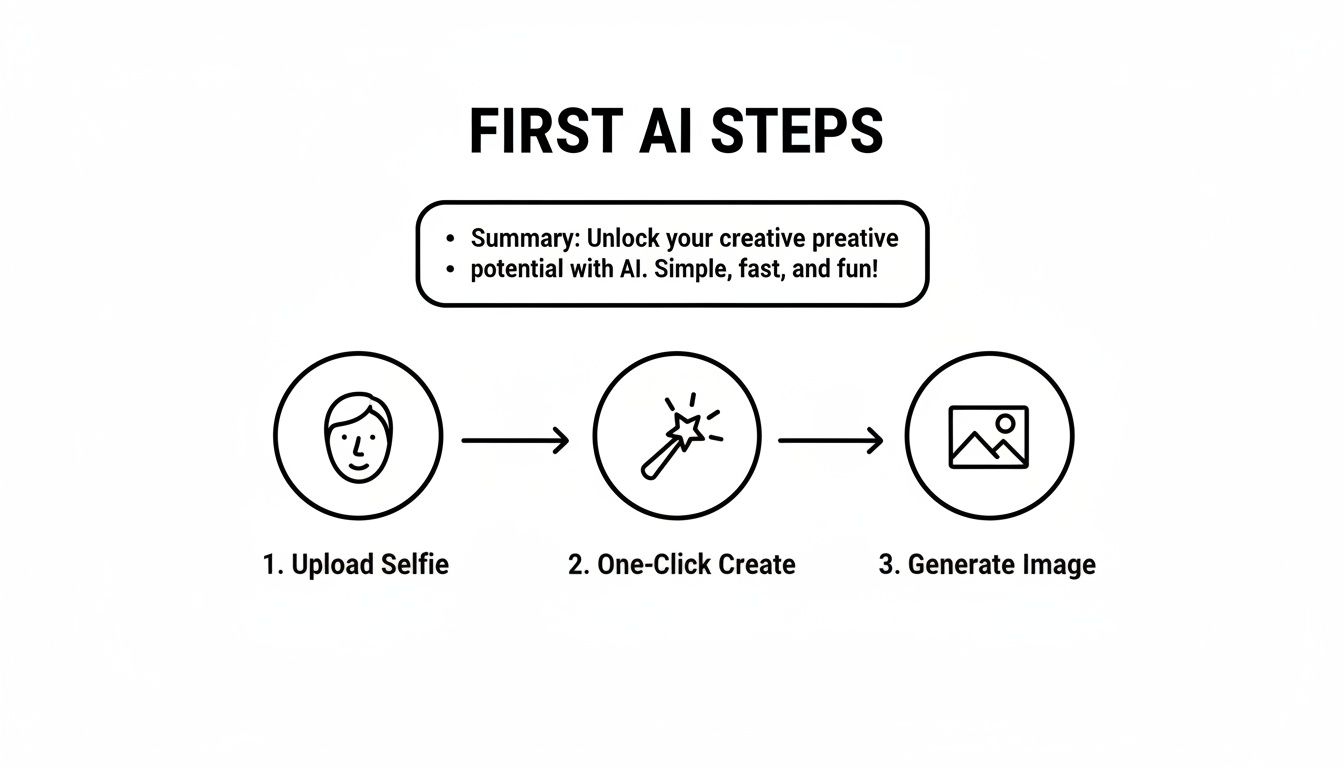
This straightforward workflow lets you pour all your creative energy into crafting the perfect prompts.
Crafting prompts that consistently deliver the style you want takes a bit of practice. Below is a quick cheat sheet to help you dial in some popular aesthetics for your AI influencer.
Prompt Crafting for Specific Styles
| Desired Style | Key Prompt Elements | Example Negative Prompts |
|---|---|---|
| Boudoir/Intimate | "boudoir photography", "soft window light", "silk sheets", "intimate gaze", "sensual pose", "shallow depth of field", "shot on film" | "harsh lighting", "cluttered background", "cartoon", "illustration" |
| Fitness/Active | "athletic build", "defined muscles", "gym setting", "yoga pose", "workout gear", "dynamic action shot", "natural lighting" | "blurry", "sedentary", "out of focus", "poorly drawn limbs" |
| High Fashion | "editorial photoshoot", "haute couture", "dramatic lighting", "vogue style", "avant-garde", "full body shot", "designer brand" | "casual", "selfie", "jpeg artifacts", "simple background" |
| Fantasy/Cosplay | "elf warrior", "cyberpunk hacker", "ornate armor", "glowing magic", "fantasy landscape", "cinematic lighting", "concept art" | "realistic", "modern clothing", "normal", "boring" |
Think of this table as a starting point. Mix and match these elements to develop a style that's uniquely yours.
The Strategic Use of Negative Prompts
Telling the AI what you want is only half the battle. You also have to tell it what you don't want. That’s where negative prompts come in—they're an absolutely essential part of your toolkit.
These are simply keywords you add to steer the AI away from common mistakes or unwanted elements. For example, AI models are notoriously bad at hands and can sometimes generate images with extra fingers or weirdly bent limbs. By adding terms like "deformed hands, extra fingers, poorly drawn feet" to your negative prompt, you can clean up your results dramatically without endless re-rolls.
Negative prompts are your quality control filter. Use them to weed out imperfections, avoid specific art styles, and make sure every single image fits your influencer’s brand.
Achieving Unbreakable Character Consistency
For an AI influencer to feel real, they have to look the same in every post. Inconsistency is the fastest way to shatter the illusion and lose your audience’s trust. Luckily, platforms like CreateInfluencers are built to solve this exact problem.
The face-swapping feature is the cornerstone of consistency. It uses your original selfie as a permanent anchor, applying that same face to every image you generate. This ensures your character’s most important feature is always spot-on. If you want to dive deeper into this, our guide on what makes a good character design has you covered.
To take it a step further, I recommend creating a "character sheet" for yourself—a list of prompt terms you reuse every single time. This could include phrases describing unique tattoos, a signature hairstyle, or specific body proportions. By combining a consistent face with these recurring text prompts, you’re essentially creating a digital DNA for your character that the AI can replicate with incredible reliability.
Getting Pro-Level Quality with Advanced Settings
If you’re serious about building a brand or making money from your AI creations, simply hitting "generate" isn't enough. Moving beyond the basics is what separates the amateur stuff from the truly professional-grade content. This means getting your hands dirty with the technical settings that control the finer details of your final image.
Don't let that intimidate you. Think of these settings as your creative levers. Mastering them gives you precise control, ensuring your images look incredible on every platform your audience uses.
Nail Your Aspect Ratios for Social Media
This is the first technical hurdle, and it’s surprisingly easy, yet so many creators get it wrong. You absolutely must generate your images in the correct aspect ratio for the platform you're posting to. I've seen countless stunning images get ruined by awkward, forced cropping on Instagram or Twitter simply because they weren't made with the right dimensions from the start.
It's like filmmaking—a director shoots differently for a giant IMAX screen than for a vertical phone screen. You have to do the same for your AI influencer.
- Instagram Grid: Stick to a 1:1 (square) or 4:5 (portrait) ratio. I usually lean toward 4:5 because it takes up more vertical real estate in the feed and grabs more attention.
- Instagram & TikTok Stories: It’s 9:16 (vertical), no exceptions. Anything else gets cropped or ends up with ugly black bars, which screams unprofessional.
- Twitter/X & Facebook: These are a bit more forgiving, but a 16:9 (landscape) ratio typically looks best for in-feed posts and gives your work a more cinematic feel.
Getting this right from the beginning saves you so much time and frustration later on. Your content will always look polished and intentional.
Dialing in Creativity with the CFG Scale
The CFG (Classifier-Free Guidance) scale is one of the most powerful tools you have. In simple terms, it tells the AI how strictly it needs to follow your prompt.
A low CFG value gives the AI more creative freedom. It might interpret your prompt loosely, which can lead to some cool, unexpected results. Crank the CFG value high, and you're forcing the AI to stick to your instructions word-for-word, giving you a very literal interpretation.
My Go-To Setting: For most photorealistic work, I find that a CFG scale between 7 and 12 is the sweet spot. It gives you the perfect balance—the AI follows your detailed character and scene descriptions but still adds a touch of natural-looking randomness that makes the image feel real.
You have to experiment here. If your images feel too wild or stray too far from your vision, nudge the CFG scale up. If they look stiff or lifeless, dial it back down a notch.
The Non-Negotiable Step: High-Definition Upscaling
No matter how perfect your prompt is, the first image the AI spits out is usually a lower-resolution file. If you post that directly, it's going to look grainy and amateurish, especially on modern high-def screens. This is where upscaling comes in, and for pro quality, it's not optional.
Tools like the HyperReal engine on CreateInfluencers are built for this. With just one click, these upscalers use a whole separate AI model to intelligently boost your image's resolution. It adds crisp details and sharpens everything without making it look weird or artifacted. This process can take a standard 512x512 pixel image and blow it up into a gorgeous 4K masterpiece, ready for a premium content pack. For a deeper dive into this, our guide on creating realistic AI photos covers more techniques to get that lifelike quality people love.
Think about it: if you're selling a "boudoir photoshoot" themed pack, your customers expect sharp, detailed images that look like they came from a high-end camera. Upscaling is what delivers that premium experience, making your work far more valuable and justifying a higher price. It’s that final polish that takes an image from good to truly great.
Ethical Guidelines for Responsible AI Content Creation
Diving into adult AI content creation is thrilling, but it comes with a serious set of responsibilities. This isn't just about making cool images; it's about building a brand people trust. That means thinking carefully about the ethics and legal lines you need to walk.
The Hard Line on Consent
Let's get straight to the point: informed consent is non-negotiable. If you're using face-swapping tech, this is the absolute golden rule. You must have explicit, direct permission from any real person whose likeness you use.
Using someone's face without their enthusiastic "yes" is more than just bad form—it's a direct route to legal trouble and can cause genuine harm. This is a massive problem that platforms are scrambling to address. In fact, one analysis of an AI image tool found a shocking 72% of abuse-related image requests targeted women, which really underscores why your personal responsibility is so crucial. You can read more about these findings on AI platform abuse at info-res.org.
Playing by the Platform's Rules
Places like OnlyFans and Fanvue aren't the wild west. They have very specific policies for AI content, and if you ignore them, you're risking a swift ban. It’s that simple.
So, what do they usually demand?
- You Must Disclose It's AI: Be upfront. Your audience needs to know they're interacting with an AI-generated character. Trying to pass off an AI influencer as a real person will shatter trust and get you booted.
- Watermarks are Often Required: Many platforms insist on a visible watermark on AI images. It’s a clear, constant reminder of where the content came from and helps stop it from being stolen or misused.
The bottom line is that transparency is your biggest advantage. Fans are often genuinely curious and excited about AI personas, but they want to be part of the experience, not tricked by it. Honesty will always build a more loyal community than deception.
Tools like CreateInfluencers are built with this in mind, giving you a straightforward way to create and manage your personas ethically.
The platform is designed to help you build a unique AI character from scratch, starting with something as simple as a selfie. This focus on originality is the first step toward responsible creation.
What You Need to Know About AI and Copyright
Copyright law for AI art is still being figured out, but a few key ideas are taking shape. Right now, images made entirely by an AI with little human direction might not qualify for copyright protection in some places. This is a big deal if you're trying to build and protect a unique brand.
Your best defense is to lean into the human element. The detailed prompts you craft, the unique character you develop, and the edits you make after the image is generated—all of that is your creative input. The more of yourself you put into the work, the stronger your claim of ownership becomes.
For a deeper look into platform-specific guidelines, our article on the Character AI NSFW policy touches on similar issues.
By making consent your top priority, following platform rules, and understanding the copyright landscape, you're not just covering your own bases. You're helping build a more professional and respected industry for every creator in this space.
7. Cashing In: How to Monetize Your Adult AI Image Content
Alright, you've mastered the art of creating stunning AI images. That's the fun part. Now comes the real challenge: turning those pixels into profit. With your polished image sets ready to go, it’s time to think like an entrepreneur. This means picking the right digital storefronts, crafting offers your audience can't refuse, and building a loyal community.
The timing couldn't be better. The entire generative AI market is exploding—we're talking a projected $356.10 billion globally by 2030, with a staggering annual growth rate of 46.47% since 2024. That's not just a trend; it's a gold rush. And it signals a massive, hungry market for unique AI-generated content.
Choosing Your Platform
Where you sell your content is just as important as the content itself. Each platform has its own culture and rules. For AI creators, the big three are OnlyFans, Fanvue, and Fansly.
- OnlyFans: The household name. Its massive user base is a huge draw, but it’s also crowded. OnlyFans is a solid bet if you already have a social media following you can bring with you.
- Fanvue: This platform was literally built for AI creators. They get the community and provide tools designed specifically for virtual influencers. It's probably the most welcoming place to start.
- Fansly: If you're a control freak (in a good way), Fansly is for you. It offers incredible flexibility with multiple subscription tiers and granular content controls, which is perfect for offering free teasers to lure in paying subscribers.
Honestly, there's no single "best" choice. Fanvue is a fantastic on-ramp for newcomers. Fansly, on the other hand, gives seasoned creators the advanced tools they need to really fine-tune their business model.
Think of your AI persona as a digital product. You're not just selling JPEGs; you're building a brand. This simple mindset shift is the key to moving from one-off sales to building sustainable, recurring revenue.
Building Your Subscription Tiers
You have to give people a compelling reason to click "subscribe" and, more importantly, a reason to stay subscribed. A tiered system is the oldest trick in the book because it works.
Here’s a basic structure that you can adapt:
- The Hook (e.g., $5/month): This is your entry-level offering. It should give subscribers access to your main feed, some behind-the-scenes glimpses, and your standard photo sets.
- The Inner Circle (e.g., $15/month): Build on the first tier with more exclusive content. Think weekly photo packs that others don't get or the power to vote on the theme of your next photoshoot.
- The VIP Experience (e.g., $50/month): This is your premium, high-ticket tier. It includes everything from the lower tiers plus exclusive perks like one-on-one chats or the ability to request custom adult AI image creations.
This model clearly spells out the value at each level, making it easy for fans to justify upgrading. For a much deeper dive, check out our complete playbook on building a successful AI OnlyFans model.
Thinking Beyond Subscriptions
Don't leave money on the table by only focusing on subscriptions. Your best-performing content can be repackaged and sold again and again.
Themed photo packs are an easy win here. Bundle your top images into curated collections—"Cyberpunk Noir," "Beach Vacation," "Lingerie Lookbook"—and sell them as standalone digital products. Learning how to launch a digital product successfully is a game-changer, and the same principles apply directly to selling AI image packs.
Affiliate programs are another smart move. Many platforms, including CreateInfluencers, will pay you a commission for referring new users. You’re already creating content, so why not share your process? Drop your affiliate link when you talk about the tools you use. It's a simple way to create a passive income stream that grows alongside your direct sales.
Answering Your Questions About Adult AI Images
Diving into the world of adult AI image creation can feel a bit overwhelming at first. You might be wondering if you have the technical skills, or maybe you're stuck on how to stop your character from looking like a different person in every picture. These are completely normal hurdles, and you're definitely not alone in asking these questions.
Let's clear the air and tackle some of the most common concerns I see from new creators. My goal is to get you creating with confidence.
First off, let's bust a major myth: you do not need to be a coding wizard or a tech genius to do this. The tools available today are built for artists and storytellers, not programmers. The heavy lifting is done for you. Your real job is to be the creative director.
If you can describe the image you see in your head, you have the single most important skill needed to start generating stunning, high-quality images right now.
Can You Actually Make Money with AI Images?
Yes, absolutely. I see creators every day building real, profitable businesses around their AI influencers. The path to success isn't a secret, either. It boils down to creating high-quality, compelling visuals, sticking to a consistent posting schedule, and getting your work out there.
Platforms like Fanvue, Fansly, and even OnlyFans are generally open to AI content, but they all share one non-negotiable rule: you must disclose that your character is AI. Honesty is your best policy here. Fans are often fascinated by the idea of an AI persona, but they want to be part of the experience, not feel tricked.
Monetization is so much more than just selling pictures. You're building a brand, a personality, and a story that people connect with and want to support. That's what creates long-term income.
Think bigger than single images. Offer exclusive themed photo packs, behind-the-scenes "generation" content, or even custom image requests. This approach lets you build multiple income streams from a single AI influencer, making it a very real and growing business model.
How Do I Keep My Character Looking the Same?
This is the big one. It's probably the single biggest frustration for anyone starting out, but it's completely fixable. When your character’s face changes from one post to the next, it breaks the illusion for your audience and makes it impossible to build a recognizable brand.
The most effective solution is to use a face-swapping feature, like the one built into CreateInfluencers. By using the exact same source photo as a reference for every image you generate, you're essentially locking in your character's facial identity. This ensures the most important part of your AI model stays consistent, no matter the scene, outfit, or art style.
Beyond the tech, your text prompts are your other secret weapon.
- Make a "Character Sheet": Keep a simple text file with your character’s core features.
- Get Specific: Don't just say "red hair." In every prompt, specify "woman with long curly red hair, bright green eyes, a sprinkle of freckles on her nose."
- Copy and Paste: Reuse these exact phrases every single time.
When you combine a locked facial reference with consistent text descriptions, you create a kind of digital DNA for your character. They become easily and reliably reproducible.
What are the Biggest Mistakes to Avoid?
I've seen a few common missteps trip up new creators. Sidestepping these will save you a ton of headaches, protect your reputation, and result in a much better final product. The most critical mistakes usually involve ethics, quality, or a lack of strategy.
First, ethics. This is non-negotiable. Never, ever use a real person’s image for face-swapping without their clear, enthusiastic, and informed permission. It’s a massive ethical line to cross and can have serious consequences.
Second, don't skimp on quality. Posting blurry, low-resolution, or artifact-heavy images just looks unprofessional. Always take the extra step to upscale your work. Using an upscaler, like the HyperReal engine, can turn a standard generation into crisp, high-definition art that people will actually pay for.
Finally, don't just create randomly and hope for the best. A lack of strategy is a surefire way to get stuck. Plan out your content themes, develop your character's personality, and have a clear game plan for promoting your work on sites like X (Twitter) and Reddit to pull traffic to your paid platforms. Creating the content is only half the battle; marketing is the other half.
Ready to create an AI influencer that's uniquely yours? CreateInfluencers packs everything you need into one easy-to-use platform, from one-click character creation to professional-grade upscaling. Start creating for free today.