Mastering AI Generated Portraits A Practical Guide
Discover how to create stunning AI generated portraits. This guide provides actionable steps for prompt engineering, monetization, and brand building.
AI-generated portraits are incredibly realistic images of people that an artificial intelligence creates, often using just a few of your own selfies as a starting point. Think of it as having a professional photoshoot on-demand, without ever needing a camera, fancy lighting, or even leaving your desk. It’s completely changing the game for how we build our online identities.
The New Face of Digital Identity: AI-Generated Portraits
We're in a completely new era of digital self-expression. Crafting that perfect online look used to be reserved for people with serious photography skills or the budget for professional shoots. Not anymore. With AI platforms like CreateInfluencers, anyone can generate a seemingly endless supply of high-quality, photorealistic portraits in minutes. This goes way beyond applying simple filters—we're talking about generating entirely new images of yourself in any style, location, or outfit you can dream up.
This isn't just a gimmick; it's a fundamental shift in content creation. Getting good at making AI-generated portraits is fast becoming a core skill for anyone building a brand online, whether you're a marketer, artist, or influencer. In a world saturated with stock photos and generic visuals, a unique and consistent AI-generated identity helps you cut through the noise.
Why This Is a Big Deal Right Now
The explosion in AI-generated imagery is staggering. Since 2022, people have created over 15 billion AI images worldwide—a number that took traditional photography 149 years to hit. About 34 million new AI images are made every single day, and a huge chunk of those are hyper-realistic portraits being used to build fresh digital brands.
This technology gives you the power to:
- Create a Killer Brand: Generate hundreds of images that all share the same vibe, making your Instagram grid or marketing materials look incredibly polished.
- Play with Wild Ideas: See yourself in a fantasy world, experiment with avant-garde fashion, or design artistic avatars without any real-world constraints.
- Ditch the Photoshoot Headaches: Forget about the scheduling, logistics, and high costs of traditional photography.
The real magic of AI portraits is how they close the gap between your imagination and reality. If you can picture a specific look or scene, you now have the tools to bring it to life in minutes. That’s a level of creative control over your digital footprint that was unthinkable just a few years ago.
Getting a Handle on the Basics
To really get what’s going on with AI-generated portraits, it helps to understand the bigger picture of What Is AI Generated Content Explained. Essentially, AI portrait generators use sophisticated algorithms that have been trained on massive libraries of images. When you upload your selfies, the AI analyzes and learns your unique facial features. From there, it can place your likeness into entirely new scenes based on the text descriptions, or "prompts," you give it.
Let's break down the main reasons creators are flocking to this technology.
Key Advantages of Using AI for Portrait Creation
| Benefit | Description | Impact for Creators |
|---|---|---|
| Speed & Efficiency | Generate dozens of high-quality portraits in minutes, not days or weeks. | Frees up massive amounts of time to focus on strategy, engagement, and other creative work. |
| Cost-Effectiveness | A small subscription fee replaces the high costs of photographers, studios, and equipment. | Makes professional-grade branding accessible to everyone, regardless of budget. |
| Creative Freedom | Create any scene, style, or concept imaginable without physical limitations. | Unlocks limitless possibilities for storytelling and personal expression. |
| Brand Consistency | Easily produce a large volume of images with a unified aesthetic and style. | Builds a stronger, more recognizable, and professional-looking online brand. |
Ultimately, AI puts the power of a full-scale production studio right at your fingertips.
This process lets you build more than just a few cool pictures; it lets you construct an entire digital persona. To get a better sense of how these AI characters are brought to life, check out our guide on creating AI-generated humans. Understanding these fundamentals is the first step toward moving from simple image generation to crafting a truly compelling and believable online presence. In the next sections, we'll get into the practical, hands-on steps to make it happen.
Your Workflow for Crafting the Perfect Digital Self
Creating a compelling AI-generated portrait is more than just clicking a button. It's a craft, and it starts long before you ever type a single prompt. The entire process hangs on the quality of your input photos. Think of the AI as an incredibly talented artist who is also extremely literal—what you give it directly shapes what you get back.
The real goal here is to feed the AI a clean, comprehensive dataset of your face. Your phone's camera roll is a great place to start, but you have to be picky. The AI needs to learn your features from all sorts of angles and in different lighting to build a digital version of you that's both accurate and versatile.
This simple workflow breaks down the core process.
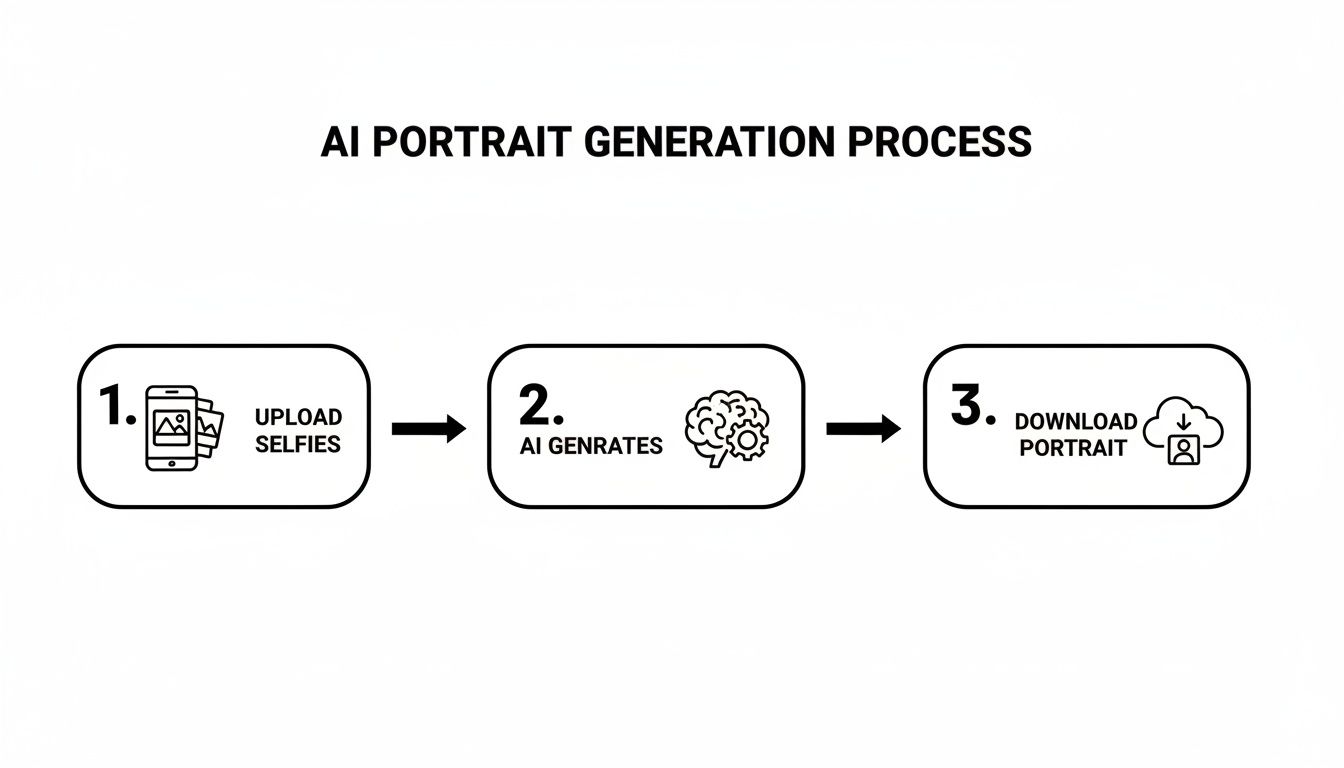
As you can see, the AI generation is just the middle step. The magic really happens in the prep work you do beforehand and the choices you make afterward.
Curating Your Essential Reference Photos
The foundation of any great AI portrait is a solid set of reference selfies. You're not just showing the AI what you look like; you're teaching it. For the best results, I've found that aiming for around 15-20 high-quality images is the sweet spot.
Here’s what you should be looking for in a good reference photo:
- Varied Angles: Give it everything. Photos looking straight on, from the left, from the right, and even slightly up or down. This is how the AI builds a 3D map of your facial structure.
- Diverse Lighting: Don't stick to perfectly lit shots. Mix in some photos in natural daylight, some with standard indoor lighting, and even a few with soft shadows. This shows the model how your face catches the light in different situations.
- Clean Backgrounds: A simple, uncluttered background is your best friend. You want the AI focused entirely on you, not the messy bookshelf or busy street behind you.
- Expressive Range: Hand over a mix of expressions. A neutral face, a genuine smile, maybe a more serious look. This gives the AI a library of emotions to pull from when you ask for a specific mood later.
Steer clear of group photos, pictures where sunglasses or heavy shadows obscure your face, and definitely avoid blurry, low-resolution images. The clearer the input, the more realistic and flexible your final AI model will be.
Mastering the Art of Prompt Engineering
Once your reference photos are uploaded, you get to the creative heart of the process: prompt engineering. This is where you shift from being the subject to being the director. A prompt is your instruction manual for the AI, and the level of detail you provide will make or break the final image.
A lazy prompt like "a photo of me" is going to give you a generic, uninspired result. A strong prompt, on the other hand, paints a vivid picture for the AI to bring to life.
A great prompt is a recipe. It lists every key ingredient—subject, style, lighting, setting, and mood—so the AI can cook up exactly what you envisioned. Skipping details is like leaving out half the ingredients and just hoping for the best.
Try building your prompts with a formula like this:
[Subject Description] + [Artistic Style] + [Lighting Details] + [Setting/Background] + [Composition & Camera Specs]
Let’s put that into practice. Say you need a professional headshot for your LinkedIn profile.
- Weak Prompt:
professional headshot - Strong Prompt:
Corporate headshot of a person, soft studio lighting, blurred office background, looking at camera, high-resolution, taken with a 50mm lens
See the difference? That level of detail leaves almost nothing to chance. You've told the AI not just what to make, but how to make it. If you're just getting your feet wet and want to experiment, our guide on how to generate AI images for free is a great place to find some starter ideas without any cost.
Leveraging Style Presets and Themed Packs
Now, writing intricate prompts from scratch every time can be a drag, especially when you need a bunch of images that all share the same vibe. This is exactly where style presets and themed photo packs become workflow game-changers.
Think of these packs as pre-made collections of expert-level prompts, all designed to hit a specific look or feel.
For instance, a platform like CreateInfluencers might have packs like:
- The "Tinder" Pack: Fine-tuned to create flattering, well-lit photos that are perfect for a dating profile.
- The "Old Money" Style: Generates portraits with that classic, luxurious aesthetic, dialing in specific clothing and backdrops.
- The "Instagram Shoot" Pack: Creates a whole series of influencer-style shots with different poses and settings, all ready for a cohesive feed.
Using a preset doesn’t mean you lose creative control. I often use them as a starting point and then tweak the prompt with my own details to make the output unique. It's the perfect blend of speed and customization, giving you a ridiculously efficient way to produce tons of top-tier ai generated portraits.
Taking Your Portraits to a Photorealistic Level
Alright, you've got your reference photos dialed in and you're getting comfortable with prompting. Now it's time to get into the really cool stuff—the tools that take a decent AI portrait and make it look so real you'd swear it was a professional photograph. This is where we move past basic generation and start acting more like a digital art director.
We're talking about taking a face you've trained and putting it into any scene, with perfect lighting and realism. The secret lies in a few key features, particularly face and body swapping.
Nail the Look with Face and Body Swapping
Face swapping isn't just some gimmick; it’s a game-changer for consistency, especially when you need a lot of images. Let's say you're building out a portfolio for an AI influencer. Trying to generate a hundred different photos from scratch and hoping the face looks the same every time is a recipe for frustration.
A much smarter workflow is to first find or generate a "base" image that has the perfect body, pose, and lighting. Once you have that, you use a face-swapping tool to drop your AI model’s trained face right onto it. The tech is smart enough to map the facial features and adjust for the lighting and angle of the original shot, making the final result look completely natural.
This same logic works for body swapping, which lets you place your model into virtually any outfit or environment you can imagine. For creators on platforms like OnlyFans or Fanvue, this is an absolute lifesaver for creating themed content on the fly.
For instance, you could:
- Grab a stock photo of someone in a high-end business suit in a corner office.
- Use body swapping to put your AI model into that scene.
- Apply a final face swap to lock in the likeness perfectly.
This method gives you an incredible amount of control. You're no longer just rolling the dice with a prompt. You're directing the pose, the setting, and the face, piecing together the perfect ai generated portraits instead of hoping the AI gets it all right in one go.
Get Crystal Clear with High-Definition Upscaling
Most AI generators spit out images at a resolution that's fine for a quick look on your phone, but they tend to fall apart when you need them for something more demanding. If you want to print your work or use it for a high-quality website banner, you absolutely need an upscaler.
Engines like the HyperReal engine inside CreateInfluencers are essential for this. An upscaler does more than just enlarge a picture; it uses AI to intelligently add detail, sharpen blurry edges, and clean up any weird artifacts. It looks at the existing pixels and smartly fills in the gaps, turning a standard 1024x1024 image into a high-definition work of art.
Honestly, if you're serious about creating professional-grade AI portraits, upscaling isn't optional. It’s a mandatory final step.
A Look at HyperReal Upscaling
Imagine you've just generated a killer headshot for a client's website. It looks great as a thumbnail, but when you stretch it to fit the homepage banner, it instantly becomes a soft, pixelated mess.
That’s the exact problem HyperReal was built to solve. By processing that image through the upscaler, the AI effectively reconstructs it at a much higher quality.
- Before Upscaling: You might notice digital "noise," soft edges around the hair, and a general lack of fine detail in the skin or clothing.
- After Upscaling: The final image is sharp and clean. You can see realistic skin pores, the crisp texture of fabric, and even individual strands of hair. The difference is staggering.
This is the kind of technology that allows your AI creations to stand shoulder-to-shoulder with traditional photography. It makes your work ready for any professional use case you can think of. If you want to go deeper on this, learning how to craft a truly realistic AI photo is a great next step, and it almost always involves these powerful upscaling methods.
Bringing Your Stills to Life with Video
The real cutting edge is when we go beyond static photos and start creating video. The most advanced platforms now let you take a single AI portrait and animate it, creating short, eye-catching clips that are perfect for social media.
You can make your AI model blink, smile, or gently turn their head. It’s a simple touch, but it adds a layer of life that a still image just can't replicate. For an AI influencer, these subtle animations make their profile feel more real and interactive, which is a huge engagement boost for Instagram Stories or TikTok. It’s the final piece of the puzzle in making a digital persona feel truly alive.
How to Monetize Your AI Portraits and Build a Brand
Okay, so you’ve mastered the art of creating stunning AI portraits. That’s a fantastic skill, but the real magic happens when you turn those pixels into profit. This isn't just about making cool art; it's about building a digital asset that can actually put money in your pocket. The first, and most important, step is to stop thinking of your AI persona as a one-off project and start treating it as the cornerstone of a brand.
Your social media profiles, especially on visually-driven platforms like Instagram and TikTok, are about to become your living portfolio and primary sales funnel. This is where you bring your AI influencer to life—giving them a personality, a consistent aesthetic, and a compelling backstory. Consistency is everything here. A cohesive feed tells a story, and that story builds a loyal following that eventually becomes your customer base.
Building Your AI Influencer Brand
Every memorable AI influencer has a narrative. Who are they? A globetrotting adventurer documenting their travels? A high-fashion model gracing digital runways? Maybe they're a down-to-earth fitness guru or a cozy homebody who loves to bake. Figure this out early, because this identity will dictate every single piece of content you generate.
The real goal is to make the persona feel believable and, surprisingly, relatable. Use your AI portrait skills to place them in different scenes and situations that all tie back to their core story. This kind of consistent visual storytelling is what separates a truly memorable AI brand from just a random collection of cool images.
To really get your creation in front of the right people, understanding how to use AI for Facebook Ads can be a game-changer. Paid advertising lets you zero in on users who are most likely to connect with your persona, giving your brand's growth a serious boost.
Entering the Adult Content Creation Niche
Let’s talk about one of the most direct and, frankly, lucrative ways to monetize ai generated portraits: adult content platforms. Sites like Fanvue and Fansly are booming with AI creators, and they've cultivated an audience that is actively looking for—and willing to pay for—virtual companionship and exclusive digital content.
The workflow itself is pretty straightforward, but it demands dedication. You'll be using your AI model to generate themed photo sets and videos, often tailored to subscriber requests or popular niches. This could be anything from boudoir-style shoots to more explicit material, all created safely and ethically within a digital environment.
The big advantage for creators here is the freedom to produce highly specific content and fulfill fantasies without the logistical or personal boundaries of traditional adult work. You are in complete control of the entire production line, from concept to final render, which makes for a highly scalable and secure business model.
Platforms like CreateInfluencers are built specifically to support this kind of work, offering specialized tools to help you create realistic and consistent adult-themed content. If you want to get a better handle on the financial side of things, exploring different strategies on how to make money with AI can open your eyes to the full potential of this fast-growing industry.
Expanding Your Revenue Streams Beyond Subscriptions
While subscriptions are a fantastic and reliable income source, a truly resilient AI brand diversifies. Once you've built an engaging AI persona with a dedicated following, that itself becomes a valuable asset you can monetize in many other ways.
Let's look at how you can branch out beyond subscriptions with a variety of monetization models.
Monetization Models for AI Influencers
| Strategy | Platform(s) | Potential Income | Effort Level |
|---|---|---|---|
| Brand Sponsorships | Instagram, TikTok, YouTube | High | Medium |
| Affiliate Marketing | Blogs, Social Media | Medium | Medium |
| Digital Product Sales | Gumroad, Etsy, Own Site | Varies | High (Upfront) |
| Custom Content | Fanvue, Fansly, Patreon | High | High (Ongoing) |
| Print-on-Demand | Printful, Redbubble | Low-Medium | Low |
Each path offers its own set of opportunities and challenges. A well-rounded strategy often involves mixing a few of these together to create multiple, stable streams of income.
Here are a few powerful alternatives to consider:
- Brand Sponsorships and Collaborations: Once your AI influencer gains traction, real-world brands will pay for them to "use" or promote products. Imagine your AI model in a campaign for a fashion label or a new tech gadget.
- Affiliate Marketing: This is a natural fit. Your AI persona can recommend products or services and earn a commission from any sales made through their unique affiliate links. It works especially well for influencers in the tech, beauty, or lifestyle niches.
- Digital Product Sales: Why not sell your own digital goods? You could offer exclusive AI art packs, provide custom portrait services for your followers, or even create guides teaching others how to build their own AI brands.
The market for this is exploding. The global AI image generator market was already valued at USD 257.2 million back in 2022, with North America leading the charge with a 39.99% share. This corporate interest shows that the demand for skilled creators is only going to grow.
Ultimately, turning your AI portraits into a business is all about smart brand-building. If you can create a compelling persona, connect with a target audience, and explore different ways to make money, you can transform your creative hobby into a thriving digital enterprise.
Navigating the Legal and Ethical Landscape of AI Art
Once you start creating those stunning AI-generated portraits, you'll bump into some big questions that have nothing to do with prompt engineering. The world of AI art is a bit like the Wild West right now—the rules are being written as we go. But that doesn't mean you can just ignore them.
Getting a handle on the legal and ethical lines is non-negotiable for anyone serious about building a brand or business. Think of this not as formal legal advice, but as a practical field guide to the major topics you absolutely need on your radar. From who owns your images to how you present them, these issues will define your entire creative process.
Who Actually Owns Your AI-Generated Portraits?
This is the million-dollar question, and frankly, the answer is still a bit fuzzy. In places like the United States, copyright law was built around human creation. Since you're guiding the AI with prompts rather than drawing every pixel yourself, the final image often doesn't qualify for traditional copyright protection.
So, what does that practically mean for you?
- Platform Terms Are Your Bible: The good news is that most AI platforms, including CreateInfluencers, give you a broad license to use what you make. This usually includes full commercial rights, meaning you can sell your portraits, use them in ads, and build an entire brand around them.
- Copyright Isn't Really Yours: While you have the right to use the image, you probably don't own the underlying copyright. This makes it tough to legally stop someone else from using a nearly identical image if they happen to generate one.
The bottom line is this: you are generally free to monetize and use your creations based on the service's terms, but don't count on having exclusive ownership through copyright. It's a massive legal gray area. Always, always read the terms of service of any tool you use.
Ethical Lines and Being Upfront with Your Audience
Legal stuff aside, there's the simple matter of being a good human. When you create an AI influencer or a digital persona, honesty is the only policy. Tricking your audience into believing your AI is a real person is a fast track to backlash and a ruined reputation. Trust is everything.
Here are a few ways to keep it real:
- State clearly in your social media bio that the account is an AI persona. No mystery needed.
- Use hashtags that signal what you're doing, like #AI, #AIinfluencer, or #VirtualHuman.
- Engage with your community authentically. You don't have to pretend to be something you're not.
This transparency ties directly into something called the right of publicity. When you upload your selfies to train a model, you're giving that platform permission to create new works based on your likeness. Let that sink in—you're consenting for your face to become the raw material for countless new images.
The lines can get blurry fast, so make sure you're comfortable with how your digital self will be used. For a deeper dive into the basics, our guide on what is AI generated content is a great place to start.
Ultimately, working in this new space comes down to a mix of awareness and common sense. If you respect the platform's rules and are straight with your audience, you can build a brand with your AI portraits that's both successful and ethical.
Answering Your Top Questions About AI Portraits
Getting into AI-generated portraits can feel like learning a new instrument. You can see the incredible possibilities, but a lot of little questions pop up as you go. Let’s walk through some of the most common hang-ups I see creators run into and get you some clear, practical answers so you can start creating with confidence.
One of the first things people wonder is just how much "raw material" the AI really needs. It’s tempting to just dump a folder of photos, but quality and variety will always beat sheer quantity.
How Many Reference Photos Do I Really Need?
You'll get the best results by aiming for 15-20 high-quality selfies. The AI isn’t just copying your face; it's learning its unique structure, and for that, variety is your best friend.
Make sure you feed it a good mix of angles, lighting, and expressions. The AI needs to see you straight on, from the side, smiling, and with a neutral expression. It’s also super important to avoid photos with sunglasses, hats, or other people in the shot. You want to give the AI the clearest possible data to learn from.
Think of it like this: you're giving an artist a complete set of reference sketches, not just one blurry photo. The clearer and more comprehensive your source material is, the more accurate and flexible your final AI model will be.
Once you start getting great results, the next big question is usually about what you can legally do with them, especially if you're thinking about building a business.
Can I Use AI-Generated Portraits for Commercial Work?
For the most part, yes, but the devil is always in the details—specifically, the platform's terms of service. Most generators, including CreateInfluencers, give you full commercial rights to the images you create. That means you're free to use them in your marketing, sell them as digital products, or even build an entire brand around them.
The legal side of AI art is still taking shape, though. Always make it a habit to review the terms of any tool you use, paying close attention to clauses on copyright ownership. It’s a simple step that can save you from massive headaches later on.
AI portraits have blown up fast. In fact, 71% of consumers now believe these images are a common sight online. By 2024, 20% of Americans had already played with AI for portraits or videos, adding to the mind-boggling 34 million AI images being generated every single day. To put that into perspective, over 15 billion AI images have been created since 2022, with the Stable Diffusion model powering about 80% of them. You can discover more insights about AI image trends if you want to go down that rabbit hole.
This explosion in popularity brings up another challenge: how do you stand out and keep your look consistent?
What’s the Best Way to Get a Consistent Look?
Consistency really boils down to two things: a solid set of reference photos and disciplined, detailed prompting. After your AI model is trained on your face, the prompts you write become your director’s notes.
To keep a character looking like your character, you should:
- Use repeatable prompts. Nail down key features, clothing styles, and backgrounds that you can use again and again.
- Save your best prompts. I keep a running list of prompt formulas that I know deliver the look I’m after.
- Use character-locking features. Some of the more advanced platforms let you save a character model or use a specific "seed" number to recall a particular likeness with much better accuracy.
Of course, even the best prompts can result in some weirdness, which brings us to maybe the most common question of all.
How Do I Fix AI Mistakes Like Weird Hands or Eyes?
This is just part of the process, but don't worry, you have plenty of ways to fix it. For small glitches, often just regenerating the image with a slightly different prompt is enough to solve the problem.
You can also use negative prompts to tell the AI exactly what to avoid (e.g., "disfigured hands, extra fingers, blurry eyes"). For the really stubborn issues, you might need to do a little post-processing in a tool like Photoshop. Alternatively, using an AI inpainting feature lets you repaint just the problem area without having to scrap the entire portrait and start over.
Ready to stop wondering and start creating? With CreateInfluencers, you can build your own stunning AI persona in minutes. Sign up for free today and bring your digital self to life!