How to Monetize YouTube Shorts A Practical Guide for Creators
Discover how to monetize YouTube Shorts with proven strategies. This guide covers YPP, brand deals, and affiliate income to help you earn real money.
You can absolutely make money from YouTube Shorts, either directly through the YouTube Partner Program (YPP) by splitting ad revenue with YouTube, or indirectly through things like brand deals and affiliate marketing. To get into the YPP for Shorts, you'll need at least 1,000 subscribers and hit 10 million valid Shorts views over a 90-day period.
Your Quick Guide to Earning from Shorts
So, how do you actually start making money from those viral Shorts? While getting into the YouTube Partner Program is the official route, it's definitely not the only game in town. In fact, for many top creators, it’s just one piece of a much bigger financial puzzle.
The main path YouTube provides is a share of the ad revenue from the Shorts Feed. To get access, you have to hit those specific, non-negotiable milestones I mentioned earlier. Once you're in, YouTube pools all the money from ads shown between Shorts and then pays you out based on how many views your videos got compared to everyone else.
But you shouldn't stop there. Thinking beyond ad revenue is what separates hobbyists from professional creators. Many find that their biggest paydays come from deals and partnerships that give them far more direct control over their income.
Paths to Monetization
Let's look at the different ways you can monetize your Shorts. Each one has its own learning curve, earning potential, and is suited for different stages of a creator's journey. If you're just figuring out your niche, our guide on how to start content creation can help you build a solid foundation that aligns with these money-making strategies from day one.
Here are the most common paths creators take:
- YouTube Partner Program (YPP): This is your cut of the ad revenue. It's a great, consistent baseline income, but don't expect the per-view earnings (often called RPM) to be as high as they are for traditional long-form videos.
- Brand Deals & Sponsorships: This is where you team up with a brand to feature their product in a Short. This can be incredibly lucrative, sometimes earning you more from a single 60-second video than a month's worth of ad revenue.
- Affiliate Marketing: You recommend products you genuinely use and love, then earn a commission when someone buys through your unique link (which you can drop in your description or a pinned comment). It’s a fantastic way to build up passive income over time.
- Selling Your Own Products: Use your Shorts as a top-of-funnel marketing tool to drive your audience to your own merch, digital downloads, courses, or coaching services. This gives you 100% control over your products and profit margins.
The smartest creators don't just pick one. They build a layered strategy. Think of YPP ad revenue as your foundation, brand deals as your big income spikes, and affiliate links and your own products as the way to build long-term, sustainable wealth.
To make it even clearer, let’s compare these methods side-by-side.
Comparing YouTube Shorts Monetization Methods
This table offers a quick snapshot to help you decide where to focus your efforts, whether you're just starting out or looking to scale up your earnings.
| Monetization Method | Potential Income | Effort Level | Best For |
|---|---|---|---|
| YouTube Partner Program | Low to Moderate | Low (Passive) | Channels with high, consistent viewership. |
| Brand Deals | High to Very High | Medium | Niche creators with an engaged, specific audience. |
| Affiliate Marketing | Low to High | Low to Medium | Review, tutorial, or lifestyle-focused channels. |
| Selling Products/Merch | Very High | High | Creators with a strong personal brand and loyal community. |
As you can see, the path you choose really depends on your channel's strengths and your long-term goals.
Getting into the YouTube Partner Program
If you want to earn money directly from YouTube, the first major hurdle is getting into the YouTube Partner Program (YPP). Think of it as the official gateway to ad revenue. It's YouTube's way of verifying you've built a legitimate audience that's actually sticking around.
To get your foot in the door with Shorts, you need to hit two specific targets. First, you need 1,000 subscribers. Second, your public Shorts have to rack up 10 million valid views in the last 90 days. Hitting both these numbers tells YouTube you not only get eyeballs on your content but you've also started building a real community.
The whole monetization journey can feel a bit overwhelming, but it really boils down to three stages: qualifying, monetizing, and then diversifying.
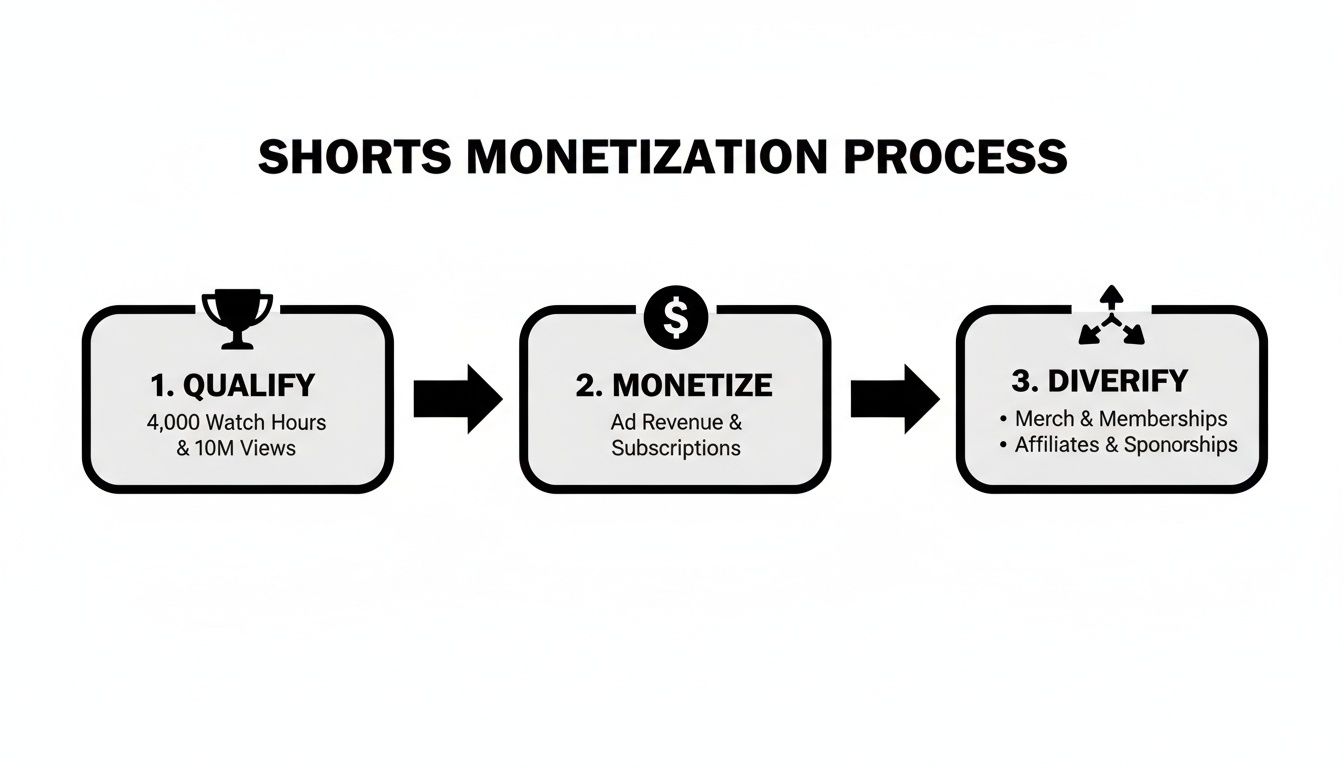
As you can see, getting into the YPP is just the starting line. The real goal is building a sustainable business as a creator.
So, What's a "Valid" View Anyway?
YouTube is pretty strict about what views actually count toward that 10 million goal. They don't want people gaming the system.
Here's what you need to know:
- It has to be your own stuff. Views on unedited clips you just ripped from movies, TV shows, or another creator’s channel won't count. You need to be adding your own creative spin to it.
- Only public views matter. If a Short is private, unlisted, or you end up deleting it, any views it got are off the table.
- You can't pay for views. Any views you get from running ads (like a Google Ads campaign) are considered inorganic, so they won't help you qualify for the YPP.
At the end of the day, YouTube wants to see genuine, organic growth from content you actually created.
How to Apply in YouTube Studio
Once you’ve hit those magic numbers, it’s time to apply. The whole process happens right inside your YouTube Studio dashboard. Just head over to the "Earn" tab.
You’ll be guided through a few simple steps:
- Review and Accept the Base Terms: This is the standard agreement for anyone joining the YPP.
- Sign the Shorts Monetization Module: This part is critical. You have to opt into this specific module to make money from ads in the Shorts Feed. If you skip it, you won't earn a dime from your Shorts, even if you're in the YPP.
- Link Your Google AdSense Account: This is how you’ll actually receive your money. You can connect an AdSense account you already have or set up a new one right there in the application.
After you hit submit, a real person at YouTube will review your channel. They're checking to make sure you follow all their rules—monetization policies, community guidelines, the works. This is where having a clear identity and purpose for your channel really pays off. A strong personal brand helps show you're a serious creator, and you can get some great tips on how to build a personal brand online in our other guide.
Understanding How Shorts Revenue Sharing Works
Let's talk about the money, because it's a bit different for Shorts than for traditional long-form videos. It’s important to set realistic expectations.
On average, creators are seeing an RPM (Revenue Per Mille, or earnings per 1,000 views) somewhere between $0.01 and $0.50. This means that 1 million views might earn you anywhere from $10 to $500, though most people land in the $30-$100 range for that many views.
Here’s a quick breakdown of how that money flows:
- The Creator Pool: Revenue from all the ads that run between Shorts in the feed gets tossed into one big pot.
- Music Licensing Fees: Before anyone gets paid, YouTube first takes out a slice to cover the costs of music licensing. If you use a popular song, part of your potential earnings goes to the music industry.
- Creator Allocation: What's left in the pool is then divided up among all monetizing creators based on their percentage of total Shorts views.
- Your Cut: Of the money allocated to you from the pool, you keep 45%.
Because of this pool system, your earnings aren't just tied to your own performance. They’re also influenced by how many other creators are getting views and how much advertisers are spending across the entire Shorts platform.
Building Income Streams Beyond Ad Revenue
Getting into the YouTube Partner Program is a huge win, but let's be real—it's just the first step. If you're banking solely on the Shorts ad revenue pool, you're building your business on shaky ground. The RPM for Shorts is notoriously low, so to build a truly sustainable career as a creator, you need to think bigger and diversify your income.
Start seeing your Shorts not just as standalone content, but as powerful, bite-sized commercials for your entire brand. Every Short that pops off is a new opportunity to grab someone's attention. From there, you can guide that new fan toward more profitable parts of your business. This is how you shift from earning pennies per thousand views to generating a real, predictable income.
Landing Lucrative Brand Deals
Beyond the ad-share model, one of the most direct ways to make money is by securing brand deals with companies that fit your vibe. A single sponsored 60-second video can often earn you more than an entire month's worth of ad revenue. It's a game-changer.
Brands are pouring money into short-form video because the engagement is off the charts. They're not just looking for channels with millions of subs, either. They're hunting for creators who have a dedicated, niche audience that actually trusts what they have to say.
Want to get on their radar? You need to look professional.
- Build a Media Kit: Think of this as your creator resume. It needs to show off your channel analytics (subscriber count, average Shorts views, audience demographics), link to your best work, and of course, include your contact info.
- Find Brands That Fit: Make a list of companies whose stuff you actually use and would genuinely recommend. If you're a fitness creator, pitching a gaming company just doesn't make sense. Authenticity is key.
- Write a Killer Pitch: Don't send a generic, copy-pasted email. Personalize it. Tell them who your audience is, why you love their product, and come with a specific video idea already in mind. Show them you've done your homework.
Remember, your influence is your currency. A smaller, super-engaged community can be way more valuable to a brand than a massive, passive one. Focus on building real connections, and the right brands will find you.
Mastering Affiliate Marketing
Affiliate marketing is another fantastic way to monetize your Shorts without a ton of extra work. It’s pretty straightforward: you promote a product or service you believe in, and you earn a commission for every sale that comes from your unique affiliate link.
This works so well because it doesn't feel like a pushy ad. You're just sharing a cool product or a solution that worked for you. For creators just starting out, getting the hang of affiliate marketing can completely change their earning potential. If you're new to this, there are great resources out there, like our in-depth guide on affiliate marketing for content creators that breaks it all down.
With Shorts, link placement is everything.
- The Pinned Comment: This is prime real estate. As soon as your Short is live, drop a comment with your affiliate link and a clear call-to-action, then pin it so it’s the first thing people see.
- The Video Description: It's less visible on Shorts, but you should still put your links there. People who are genuinely interested know to look in the description for more info.
- The "Link in Bio" Funnel: Services like Linktree or Beacons are perfect for this. Create a simple landing page with all your important links. Then, you can just say "link in bio" in your video or add on-screen text to send people there.
For instance, if you're a tech creator reviewing a new microphone, you could end your Short by saying, "I've got this whole setup linked in my pinned comment!" It's a simple, direct way to guide interested viewers right where they need to go.
Selling Your Own Products and Services
This is the end game for creator monetization: selling something that is 100% yours. You get total control over the product, the pricing, and you keep all the profits. Your Shorts essentially become the top of your marketing funnel, driving traffic straight into your own ecosystem.
And don't just think about merch. While t-shirts and hats are cool, digital products that tap into your expertise can be far more profitable and scalable.
| Product Type | Example Creator Niche | Why It Works |
|---|---|---|
| Digital Guides/E-books | A DIY home improvement channel | Sells a "Beginner's Guide to Power Tools" PDF. |
| Templates & Presets | A mobile photography creator | Offers custom Lightroom presets for editing photos. |
| Online Courses | A personal finance influencer | Creates a course on "Budgeting for Millennials." |
| Coaching/Consulting | A career advice channel | Offers one-on-one resume review sessions. |
You can use your Shorts to tease content from your products, show a behind-the-scenes look at how you made them, or share a quick testimonial from a happy customer. This strategy is what turns you from being just a content creator into a full-fledged entrepreneur.
How to Create Shorts That Rack Up Millions of Views
Let's be real: you can't monetize what nobody sees. Before you even think about revenue, you have to master the art of making Shorts that the algorithm favors and viewers can't scroll past. It’s a mix of psychology, tapping into trends, and smart production that separates a viral hit from a video that gets lost in the feed.
The DNA of a viral Short is surprisingly simple. It all comes down to a few key elements that stop the scroll, hold attention, and get people to re-watch or share. If you can nail this formula, you'll be on the fast track to hitting that crucial 10 million view threshold.

Nail the First Three Seconds
Your first three seconds are everything. Seriously. The Shorts feed moves at lightning speed, so there’s absolutely no time for a slow intro. You need an immediate hook that piques curiosity, asks a question, or throws a visually stunning scene at the viewer. A powerful opening isn't just nice to have—it's non-negotiable.
Here are a few ways to craft an opening that sticks:
- Show, don't just tell: Start with the finished cake, the "after" shot of the room makeover, or the most dramatic part of your story. Then, spend the rest of the Short unpacking how you got there.
- Use attention-grabbing text: Bold on-screen text like "You're cleaning your kitchen all wrong" or "The one travel hack I can't live without" immediately tells the viewer what they're getting.
- Create a visual jolt: A slick transition, an unusual camera angle, or a sudden burst of color can be all it takes to make your video pop off the screen.
Learning how to craft the perfect opener can massively boost your view duration. For a deeper look, check out this guide on creating a powerful social media hook that grabs attention from the get-go.
Jump on Trending Audio and Formats
You don't always have to reinvent the wheel. Trending audio and popular formats are your best friends for reaching a wider audience because the YouTube algorithm is already pushing that type of content. Think of a trending sound as a signal flare, telling YouTube your video is relevant right now.
The trick is to adapt these trends to your own niche. If a popular sound features a dance, how can you, as a finance creator, use it to make a point about the stock market? It's that blend of familiarity (the trend) with novelty (your unique spin) that often leads to viral success.
Pro Tip: Don't just copy a trend—contribute to it. Put your own twist on it, add a surprise ending, or offer a perspective no one else has. That’s how you build a real following instead of just getting a few temporary views.
Use AI to Create Content at Scale
Consistency is king on YouTube, but let’s face it, creating high-quality, original content every single day is a grind. This is where AI tools can give you an almost unfair advantage, helping you work smarter, not just harder.
It’s about amplifying your creativity, not replacing it. AI can handle the heavy lifting of video generation, freeing you up to focus on strategy, killer hooks, and engaging with your growing community. If you want to keep up the relentless posting schedule the algorithm loves, it pays to explore the best tools for social media content creation and see how AI can fit into your workflow. By building a scalable content engine, you’ll be in a much stronger position to hit your monetization goals.
How to Analyze Your Shorts Performance and Earnings

Making content is just the first step. The real secret to winning on YouTube is figuring out what works and why. If you want to actually monetize your Shorts, you have to move past simply refreshing your view count and start digging into the data inside YouTube Studio.
This is where the magic happens. Your analytics dashboard is your command center, showing you which Shorts are grabbing eyeballs, which are getting swiped away, and—most importantly—how all those views turn into dollars. Making a habit of checking these numbers lets you spot trends and double down on the content that truly connects with your audience.
The Key Shorts Metrics You Should Actually Watch
When you first pop open the "Analytics" tab in YouTube Studio, it can feel like a lot to take in. Don't get overwhelmed. The trick is to filter your data to show only your Shorts performance, which gives you a clean, focused look at what matters.
Here are the numbers I always keep an eye on:
- Views: This is your basic "did it pop off?" metric. Look for the spikes—those are your viral hits. Your job is to figure out what made them special and replicate that success.
- Watch Time: While not as critical as it is for 20-minute vlogs, this still tells you if your Shorts are genuinely engaging. A higher average view duration is a great sign for the algorithm.
- Subscribers Gained: This is huge. It shows you which Shorts are turning casual viewers into actual fans. Building a loyal community is the foundation of long-term income.
- Audience Retention: Pay close attention to the "Viewed vs. Swiped Away" metric. A high percentage of viewers sticking around means your hook is working and your content is compelling from the get-go.
By keeping tabs on these figures, you can spot clear winners. For instance, if a quick Short about a specific DIY hack brought in 500 new subscribers, that's a massive signal to create a whole series on that topic. This is where you can get smart; using some of the best AI tools for content creators can help you quickly spin up new variations of your successful formats without burning yourself out.
What to Expect From Your Shorts Revenue
Once you're in the YouTube Partner Program, the "Revenue" tab in your analytics becomes your new obsession. This is where you’ll find your Estimated Revenue from the Shorts ad revenue sharing pool. The big metric to understand here is your RPM (Revenue Per Mille), which is what you earn for every 1,000 views.
Let's be real for a second: Shorts RPM is way, way lower than what you see on traditional long-form videos. This is because of the shared ad revenue model, where all the money from ads shown in the Shorts feed gets pooled and then distributed among all the monetizing creators.
While the number per view might look tiny, it can add up with massive volume. Looking at real-world data from other creators gives us a solid baseline.
Real YouTube Shorts Earnings Examples
Here's a look at what some creators have publicly shared about their Shorts earnings. It helps paint a picture of what's possible and sets some realistic expectations.
| Source/Creator | Views (Millions) | Total Earnings | Effective Rate (Per 1M Views) |
|---|---|---|---|
| TubeBuddy Experiment | 3.1 | $99.87 | ~$32.21 |
| Zach King | 1,200 (1.2B) | $53,000 | ~$44.17 |
| Stephen Sharer | 830 | $47,000 | ~$56.62 |
| Finance with Amandine | 2.8 | $118.80 | ~$42.43 |
As you can see, the numbers vary, but they consistently fall into a similar range per million views. Don't get discouraged by a low RPM. Instead, use this data as a tool. Figure out which content styles or topics are bringing in a slightly higher RPM and lean into them. Analyzing your earnings isn't just about counting your money—it's about gathering intelligence to make smarter content that grows your entire channel.
Common Questions About Monetizing YouTube Shorts
Stepping into the world of Shorts monetization can feel a bit like navigating a maze. You see those massive view counts piling up, but the actual path to turning them into income isn't always clear. Let's break down some of the most common questions and roadblocks creators run into.
Does Using Popular Music Hurt My Earnings?
Yes, it absolutely does, and it's a trade-off every creator needs to understand. Tapping into a trending song is an incredible way to get your Short in front of more eyes, but it comes at a direct cost to your ad revenue.
Here's how it works: when you use a licensed music track from YouTube's library, they deduct the licensing cost before your share is even calculated from the Creator Pool. So, the more licensed music you use, the less of that revenue pie is left for you.
- One Music Track: If you use a single song, the revenue gets split between the Creator Pool and the music publishers.
- Two or More Tracks: Layering multiple licensed tracks can slash your potential earnings even more, sometimes by over 50%.
If your main goal is to maximize your direct ad earnings, your best bet is to stick with original audio or high-quality royalty-free music. Think of trending sounds as a tool for growth—use them when you're trying to go viral and build your audience, not when you're trying to maximize your ad payout on a specific video.
Can I Monetize My TikTok Videos on YouTube?
You can definitely monetize the same video content on different platforms, but there's one golden rule: no watermarks. YouTube's algorithm isn't a fan of content that screams "I was made for another app." Uploading a Short with a big TikTok or Instagram Reels logo is one of the fastest ways to get your video's reach throttled and make it ineligible for monetization.
My best advice is to get into the habit of saving a clean, watermark-free version of your video the moment you finish editing. This becomes your master file. From there, you can upload it natively to each platform, making it look professional and tailored for that specific audience.
This simple step does more than just keep you on the right side of the rules. It shows viewers you’re creating for them on YouTube, not just dumping content from somewhere else.
Why Are My Views High but Earnings Low?
This is probably the single most common frustration for new Shorts creators. You hit a million views and expect a decent payout, only to see a few dollars. It's not you; it's the system.
The monetization model for Shorts is fundamentally different from traditional long-form videos. With long-form, ads are tied directly to your video. With Shorts, revenue comes from a giant, shared pool of money generated from all the ads that run in the Shorts Feed. That pool is then divided among millions of creators.
The result is a much lower Revenue Per Mille (RPM), often landing somewhere between $0.03 and $0.10 per thousand views. A viral Short with a million views might only net you $30 to $100.
The key here is to shift your mindset. Don't look at Shorts as your primary moneymaker. Instead, see them as a powerful engine for audience growth. Use that massive top-of-funnel traffic to drive people to your more profitable channels—your long-form content, brand deals, affiliate links, and merch.
What Is a Valid Public Shorts View?
When you're chasing that 10 million view target to qualify for the YouTube Partner Program, not every view is created equal. YouTube needs to see that you're building a genuine, organic audience.
Here’s what makes a view "valid" and count toward your goal:
- It has to be on a public Short that you created.
- Views on videos that are private, unlisted, or have been deleted do not count.
- Crucially, any views you get from paid advertising campaigns (like Google Ads) are excluded.
This system is designed to reward creators who build a real community, not those who try to pay their way in or find loopholes. Every one of those valid views is proof that your content is connecting with people.
Ready to stop grinding and start creating content at scale? With CreateInfluencers, you can generate endless unique AI influencer videos, test viral aesthetics with themed packs, and build a content engine that helps you hit your monetization goals faster. Sign up for free and start creating today!