NSFW Text to Image Guide to Prompts Safety and Monetization
Your expert guide to NSFW text to image generation. Learn to craft perfect prompts, navigate safety, and monetize your AI creations on platforms like OnlyFans.
Welcome to a new age for adult content creation. We're in a moment where nsfw text to image generation is completely changing the game, letting creators and agencies produce stunning visuals without the usual overhead. This isn't about replacing traditional photoshoots but about adding an incredibly powerful, efficient, and creative tool to your arsenal.
This guide will break down exactly how to master this technology, from your first prompt to your final, polished image.
Stepping Into the World of AI-Generated NSFW Content
The idea of creating adult content from just a few words of text sounds like science fiction, but it's now a practical reality. It's a massive shift. For decades, professional-grade visuals meant dropping serious cash on cameras, lighting, locations, and talent. Now, platforms like CreateInfluencers hand you the keys to a virtual studio, making high-end production accessible to anyone.
But it’s about more than just cutting costs. This technology unlocks creative freedom that was simply impossible before. You can conjure up fantastical scenes, experiment with different styles on the fly, and develop a consistent look for an AI influencer—all without the logistical nightmare of a physical shoot. This opens up a huge opportunity to build a unique brand and monetize it on platforms like OnlyFans, Fanvue, and Fansly.
The Rise of Synthetic Media
The engine behind all this is a field called synthetic media. It’s a broad term for any content—images, video, audio, text—that's been generated or tweaked by AI. Getting a handle on https://createinfluencers.com/blog/what-is-synthetic-media will give you a great foundation for understanding the text-to-image tools we’re about to dive into.
The market numbers tell the story. The global AI text-to-image generator market was pegged at USD 401.6 million in 2024. That figure is expected to explode to USD 1,528.5 million by 2034. Big tech investment is pouring in, and North America is leading the charge, holding over 34.1% of the market share. It's clear this isn't a passing trend.
Key Takeaway: The barrier to creating high-quality adult content has practically vanished. AI gives individual creators the power to produce visuals that can compete with big-budget studios, letting you focus on your creative vision instead of just production logistics.
As you get comfortable with AI generation, it's smart to look at the wider ecosystem of social media content creation tools. They can help you take the images you create and market them effectively across all your platforms.
Picking the Right AI and Getting Your Workspace Ready

Alright, first things first. Before you can create anything, you need to choose your tool. This is probably the most important decision you'll make, because not all AI image generators are created equal, especially when it comes to adult content.
If you try using a mainstream model, you’re going to hit a wall. Most of them have heavy NSFW filters that will shut you down immediately, wasting your time and any credits you've spent. It's frustrating, to say the least.
That's why going with a specialized platform is a no-brainer. Tools like CreateInfluencers are built from the ground up for this specific purpose. Their models are already fine-tuned for the kind of nsfw text to image work you want to do, which means you can skip the censorship headaches and get straight to creating.
So, What Are Your Model Options?
The AI model landscape can feel a bit overwhelming, but let's boil it down. For what we're doing, the main differences are in style. Some models are brilliant at creating photorealistic people, while others are masters of anime or fantasy art. The trick is to find a platform that gives you options that match your creative vision, without constantly policing your ideas.
Here's what you should look for in a good platform:
- Unfiltered Access: This is non-negotiable. The platform needs to explicitly state that it allows and supports NSFW content. Otherwise, you’re just gambling with your prompts.
- A Variety of Styles: Don't get locked into one look. You might want a hyper-realistic model today and something more stylized tomorrow. Flexibility is key.
- It Has to Be Easy: A clunky interface will kill your creative flow. The best platforms let you switch models and tweak settings without a steep learning curve.
If you want to go deeper down the rabbit hole, our guide on the best AI image generators breaks down the pros and cons of different tools. It really puts into perspective why a dedicated tool often beats a general-purpose one for specialized work.
Setting Up Your Workspace on CreateInfluencers
Getting your account set up on a platform like CreateInfluencers is designed to be painless, even if you're not a tech person. The whole point is to get you from an idea in your head to a finished image as fast as possible. You can usually sign up for free without needing a credit card, which is great for just poking around and seeing if you like the feel of it.
Once you log in, get acquainted with the dashboard—this is your mission control. From here, you’ll see your credit balance, access all the different AI models, and find handy features like the character creator or face-swapper.
Pro Tip: Before you burn through credits, spend a few minutes just exploring. Check out the pre-made character models and any themed photo packs they offer. This is a great way to get a feel for what the platform can do and spark some ideas for your first creation.
On most of these platforms, credits are your currency. Every image you generate costs a certain number of credits, and more complex requests (like higher resolutions) might cost a bit more. Getting a handle on this system early on will help you use your resources wisely. I like to think of each credit as a shot at creating something specific, which forces me to really think through my prompts before I hit that "generate" button.
Now that you're all set up, it's time to get into the fun part: telling the AI exactly what you want it to create.
Crafting Powerful NSFW Prompts That Get Results
The real magic behind creating stunning nsfw text to image visuals isn’t some happy accident. It all comes down to the quality of your prompt. Sure, a simple one-liner might spit out an image, but a detailed, layered prompt is what separates a generic render from a piece of art that looks intentional and professional.
Think of yourself less as a user and more as a director. You’re telling the AI exactly what scene to build, piece by piece. Mastering this skill is the fastest way to get results you’re proud of without burning through credits on generations that just miss the mark.
The Anatomy of a Perfect Prompt
So, what does a great prompt actually look like? It’s not just a single command; it’s a blueprint built from a few core elements. Let’s break them down.
Subject and Action: This is your foundation. Who is in the shot, and what are they doing? Specificity is your best friend here. Instead of just "a woman in lingerie," try something like, "a confident woman with long red hair, wearing black lace lingerie, leaning against a velvet headboard." Those extra details immediately paint a much clearer picture for the AI.
Setting and Environment: Where is all this happening? The environment is critical for setting the mood. "In a dimly lit, luxurious bedroom with silk sheets" creates a completely different vibe than "in a rustic cabin with a stone fireplace."
Artistic Style: This one is huge because it defines the entire aesthetic. Are you going for pure realism or something more artistic? Using terms like photorealistic, cinematic, hyper-detailed, or even specific styles like boudoir photography or fantasy art will radically change the final look.
When you layer these elements together, you’re no longer just throwing a vague idea at the generator. You’re handing it a detailed plan, which is how you create consistent, high-quality images that fit your creative vision.
Adding Depth with Lighting and Camera Angles
If you really want to level up your images, you need to start thinking like a photographer. Lighting and camera angles are two of your most powerful tools for controlling the mood and focus of your creations.
Think about the impact of light. "Soft morning light streaming through a window" feels gentle and intimate. On the other hand, "dramatic Rembrandt lighting" will give you deep shadows and a far more intense, moody atmosphere. Use descriptive words to steer the AI.
Camera angles are just as important for telling a story.
- Eye-level shot: Creates a direct, personal connection.
- Low-angle shot: Makes the subject seem more powerful or dominant.
- High-angle shot (or bird's-eye view): Can suggest vulnerability or just offer a unique perspective.
- Close-up shot: Pulls the viewer in, focusing on intimate details and expressions.
Expert Insight: Don't just name the angle; describe the effect you're going for. "Intimate close-up shot focusing on her playful smirk" gives the AI much more emotional context than simply saying "close-up." That small tweak can make a world of difference in the final image.
The scale of what's possible here is staggering. The tech behind these tools, like Stable Diffusion, has been used to generate over 15 billion images since its launch. As these AI generation statistics from CompaniesHistory.com show, there’s massive creative potential waiting for anyone who learns to speak the AI’s language.
To help you get started, here's a quick cheat sheet for building your prompts. Keep these components in mind, and you'll be able to construct powerful prompts from scratch.
NSFW Prompt Engineering Cheat Sheet
| Component | Description | Example |
|---|---|---|
| Subject | The main person or focus of the image. Be descriptive. | a stunning woman with auburn hair and freckles |
| Action/Pose | What the subject is doing. This adds life and story. | arching her back on a silk-covered bed |
| Clothing/Attire | Specific details about what the subject is (or isn't) wearing. | wearing a delicate sheer white lace bodysuit |
| Setting | The background or environment that sets the scene. | in a sun-drenched penthouse apartment overlooking the city |
| Lighting | The type of light that defines the mood. | soft golden hour light, lens flare |
| Camera Angle | The virtual camera's position and shot type. | intimate close-up shot, from a slightly low angle |
| Style | The overall aesthetic you're aiming for. | hyperrealistic photograph, cinematic, high detail, 8k |
Putting it all together gives you a rich, detailed prompt that leaves little to chance. This structure is your key to getting exactly the image you have in your head.
The Crucial Role of Negative Prompts
Sometimes, what you don't want in an image is just as important as what you do. That's where negative prompts come in. A negative prompt is simply a list of things you want the AI to avoid, which helps you clean up common mistakes and get a much more polished result.
AI models can be weird. They sometimes struggle with hands, produce strange artifacts, or generate an image in the wrong style. A good negative prompt acts as your quality control filter.
For example, a solid starter negative prompt might look like this:
- For Quality:
blurry, low quality, jpeg artifacts, ugly, deformed - For Anatomy:
mutated hands, extra fingers, disfigured, bad anatomy - For Style:
cartoon, 3d, render, painting, drawing(if you want a photo)
Think of it as putting up guardrails. You're telling the AI, "Go make this, but whatever you do, don't include these things." It’s a non-negotiable step for anyone serious about producing clean, professional-looking images every single time.
For a deeper dive into all the different prompt components, check out our comprehensive guide to writing effective AI image prompts. It’s a fantastic resource for building out your own library of go-to prompt elements. By combining a detailed positive prompt with a sharp negative prompt, you gain an incredible amount of control over your results. You’re not just hoping for a great image—you're engineering it.
Advanced Techniques for Hyper-Realistic AI Images
Alright, so you’ve gotten the hang of writing detailed prompts. That’s a huge first step. But if you want to create content that looks truly professional, it’s time to dig into the features that separate the good stuff from the great stuff: image-to-image, face-swapping, and high-res upscaling.
These aren't just fancy add-ons; they're essential for consistency. If you're building an AI influencer, your audience needs to recognize her instantly, whether she's in a steamy boudoir shot or a casual selfie. These tools are how you make that happen, ensuring your creation is undeniably hers, image after image. It’s what transforms a cool-looking picture into a believable persona people actually connect with.
Using Image-To-Image for Consistency
Think of the image-to-image feature as your secret weapon for brand consistency. Instead of starting from scratch every time, you give the AI a reference image to work from. This provides a powerful visual anchor, telling the model, "Hey, make the new picture look something like this."
Let's say you’ve finally generated the perfect headshot of your AI character. Don't lose it! You can now use that image as the foundation for a completely new scene.
- First, upload that reference image.
- Next, write a new prompt describing what you want, like "lounging on a white sandy beach at sunset."
- Then, tweak the 'image strength' slider. This setting is crucial because it controls how much the AI sticks to your original image.
A lower strength gives the AI more room to get creative, while a higher strength will keep the new image very close to your source. This is exactly how creators produce entire themed photo sets where the character’s look is locked in across dozens of different scenarios.
Creating Your AI Avatar with Face-Swapping
Face-swapping takes this a step further, letting you stamp a specific face onto any body you generate. This is an absolute game-changer, especially if you're building an influencer around a particular look—or even your own. On a platform like CreateInfluencers, you can upload a clean, clear photo of a face (with consent, obviously), and the AI will blend it seamlessly into your new images.
Key Insight: This workflow is incredibly efficient. You can churn out a dozen different poses and body types with a simple, generic prompt, and then apply your character's face to all of them afterward. This saves a massive amount of time and credits compared to wrestling with a text prompt to get the face just right every single time.
This method gives you a degree of realism and control that text-only prompts often struggle to deliver. If you really want to get into the weeds of creating lifelike visuals, reading up on how to make AI-generated images realistic will give you an even better grasp of these advanced techniques.
This diagram shows how all the pieces of a good prompt come together.
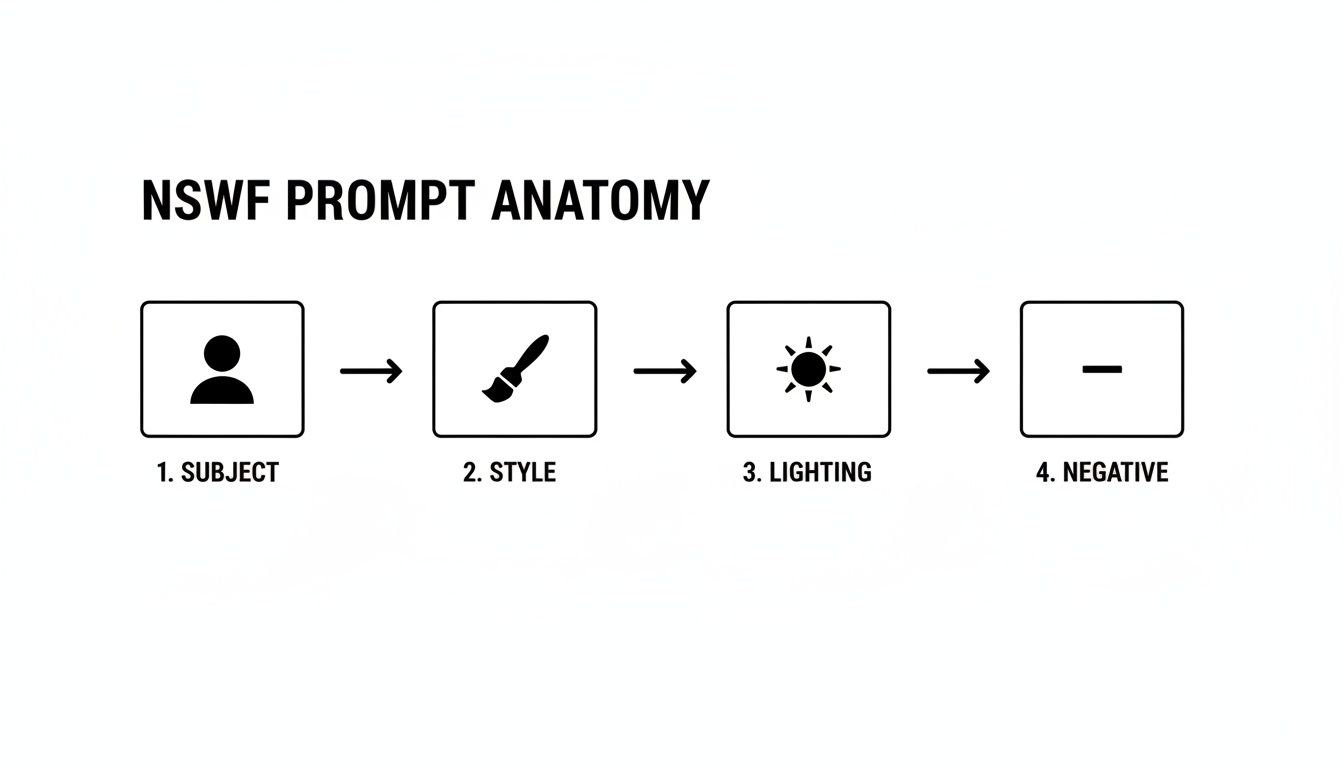
As you can see, a powerful prompt isn't just one command. It's a layered set of instructions, starting with the core subject and then building on it with style, lighting, and those all-important negative prompts to filter out what you don't want.
The Final Polish with HyperReal Upscaling
So, you've got a consistent character in a great scene. You're almost there. The last step is prepping the image for the platforms where quality is king. A standard 1024x1024 AI generation might look fine on your phone, but for subscribers on OnlyFans or Fanvue, blurry or pixelated content is a deal-breaker. They expect crisp, high-definition visuals.
This is where a good upscaler comes in. An engine like the HyperReal engine on CreateInfluencers doesn't just stretch your image; it intelligently rebuilds it at a higher resolution. The AI adds fine, realistic details, sharpening textures and turning a good image into a stunning, professional-grade photo.
For any content you plan to sell, this isn't an optional step. The perceived value of your work skyrockets with high-resolution images, making your subscriptions and photo packs far more attractive to buyers. It's that final professional touch that tells your audience you're serious about quality.
Ethical Creation and Smart Monetization Strategies
Creating compelling nsfw text to image content is one thing, but building a sustainable and responsible business around it is a whole different ball game. Once you start thinking about sharing or selling your images, you're not just an artist anymore—you're a creator operating in a space with real rules and ethical lines you can't cross. Getting this right from the start is absolutely crucial for long-term success.
The Golden Rule: Consent is Everything
Let's get straight to the most important point: consent. This isn't just a suggestion; it's the absolute bedrock of ethical AI creation, especially when you’re using features like face-swapping.
It can be tempting to use a celebrity's face or a photo of someone you know, but without their explicit and enthusiastic permission, you're stepping into a massive legal and ethical minefield. The rule is incredibly simple: if you don't have clear, unambiguous consent, don't even think about it.
Following this protects people from the misuse of their likeness in deepfakes, and just as importantly, it protects you from serious legal trouble and getting booted from platforms. A respectable brand is built on responsible creation.
Know the Lay of the Land: Platform Rules for AI Content
Every platform has its own take on AI-generated media, and these rules are changing all the time. Before you even think about uploading your work to OnlyFans, Fansly, or Fanvue, you have to do your homework and read their terms of service. Trust me, ignoring their guidelines is the fastest way to get your account shut down and watch all your hard work disappear.
The good news is that most major platforms do allow AI content, but with a few big conditions. Transparency is everything.
- Be Honest: Always disclose that your content is AI-generated. Trying to pass it off as real will only lead to broken trust, angry subscribers, and potential penalties from the platform.
- Keep it Original: Stick to creating original characters and scenes. Using copyrighted characters or trademarked brands in your images is a recipe for a takedown notice.
- Follow All Rules: Your AI content still has to comply with all other platform rules about prohibited themes and activities. AI isn't a free pass to ignore the standards.
For a deeper dive into the specifics, check out our guide on whether OnlyFans allows AI content. It’s packed with essential details to help you stay in the clear.
Key Takeaway: Your AI creations are a business asset. Protect them by playing by the rules and being upfront with your audience. This isn't just good ethics; it's a smart business strategy that builds a loyal following.
Protecting Your Work and Cashing In
So, you're creating ethically and you understand the platform rules. What's next? Protecting your images and actually making money from them. If you don't take steps to protect your work, you'll find it stolen and redistributed all over the internet, which completely devalues what you've created.
The easiest and most common way to do this is with watermarking. A tasteful watermark with your brand name or username placed strategically on your image makes it much harder for someone to steal it and pass it off as their own. It’s not a perfect solution, but it’s a powerful deterrent that marks the content as yours.
Building Your Monetization Playbook
Once your work is protected, it's time to focus on your sales strategy. Simply posting random images and hoping for the best won't get you very far. The most successful creators build an entire content ecosystem.
A fantastic approach is selling themed photo packs. Instead of trying to sell single images one by one, bundle them into high-value collections. Think "Cyberpunk City Nights," "Mystical Forest Fantasy," or "Tropical Beach Getaway." This approach dramatically increases the value of each transaction and gives customers a reason to spend more.
Another pro-level strategy is to create a full-fledged AI influencer. Give your character a name, a personality, and a consistent backstory. Suddenly, you're not just selling images anymore; you're selling a connection to a character people want to follow. This is the perfect model for building a subscription-based income, where fans pay a monthly fee for a peek into your character's "life."
As you explore how to turn your creations into cash, it helps to understand general content monetization strategies that apply across the board. The fundamentals of building an audience and providing real value are just as relevant for AI art as for any other creative field.
Troubleshooting Common Image Generation Issues
So you've crafted the perfect prompt, but the AI spits out something... weird. Don't sweat it. Getting odd or flawed results is just part of the game, not a sign you’ve done something wrong. The real skill is learning how to diagnose and fix these glitches.
Most issues boil down to a few usual suspects, like wonky anatomy or a character who suddenly looks like a different person. Instead of just hitting "generate" again and hoping for the best, you can use targeted fixes. This not only saves your credits but also teaches you how to get the AI to do exactly what you want.
Distorted Hands and Faces
Let's tackle the classic AI art problem: mangled anatomy. We’ve all seen it—hands with six fingers or faces that are just slightly off. It’s frustrating, but there are ways to fight back.
Your first and most powerful weapon is a strong negative prompt. Before you do anything else, make sure you're explicitly telling the AI what not to do.
- For Hands: Add
deformed hands, extra fingers, mutated hands, ugly, disfigured, bad anatomyto your negative prompt. - For Faces: Try using phrases like
asymmetrical face, distorted eyes, ugly, weird faceto push the AI toward a more natural look.
My Go-To Trick: If an image is almost perfect but the hands are a mess, I just reframe the shot. A quick prompt edit like "hands behind her back" or "hands out of frame" can save an otherwise great picture. It’s a smart little workaround that has saved me tons of credits.
Inconsistent Characters and Looks
Another huge headache is keeping your character looking the same from one image to the next. This is non-negotiable if you're building an AI influencer brand. You get her features just right, and then in the next generation, her hair is a different shade, or her face shape is completely off.
This is exactly what face-swapping and image-to-image tools were made for. Instead of hoping a text prompt alone will recreate her face, give the AI a reference image to use as a visual anchor. You're essentially providing a clear template, telling the model to lock onto that specific likeness. This keeps your character consistent, no matter what you have her doing.
Your Top NSFW AI Questions, Answered
Jumping into the world of NSFW text-to-image creation usually sparks a lot of questions. It's totally normal to wonder about the rules, how to get good results, and what's actually possible. Let's tackle some of the most common questions I hear from creators.
Is It Actually Legal to Make and Sell NSFW AI Art?
This is the big one, and the short answer is: it depends, but for original creations, you're usually in the clear. The law gets tricky when you start involving real people or existing characters.
Creating your own unique adult art is generally legal. The problems start when you generate images of real people without their explicit, documented consent—especially using features like face-swapping. The same goes for creating NSFW art of copyrighted characters from movies or games, which can land you in hot water.
As for selling your work on platforms like OnlyFans or Fansly, it's typically fine as long as you own the rights to the characters you create and follow the platform's specific rules.
How Can I Make My AI Character Look the Same in Every Picture?
Building a consistent look is everything if you're creating an AI influencer. No one will believe your character is real if she looks different in every post. Fortunately, there are a few reliable tricks to nail consistency.
- Lock in Your Seed: If your tool lets you, reusing the same seed number is a great way to get similar outputs every time. It’s like giving the AI the same starting point for its creative process.
- Master Your Prompt: Don't just write a new prompt for every image. Create a detailed "master prompt" that's like a blueprint for your character—nail down their exact facial structure, hair color, body type, and even specific tattoos or markings.
- Use a Reference Image: The image-to-image feature is your best friend here. Start with a solid base image of your character and use it to guide the AI for all future generations. This helps maintain that consistent look and feel.
Honestly, the easiest way to handle this is with a tool built for it. Platforms like CreateInfluencers have features like one-click character creation and face-swapping specifically to solve this consistency headache, making it much simpler to build a believable online persona.
What's the Best Trick for Fixing Weird AI Hands?
Ah, the infamous AI hands. It's one of the biggest tells that an image is AI-generated, but thankfully, it’s a fixable problem. Your most powerful weapon is the negative prompt.
This is where you tell the AI exactly what not to do. Before you even think about editing, load up your negative prompt with terms like ‘deformed hands, extra fingers, mutated hands, ugly, disfigured.’ This is genuinely the most effective first step you can take.
Sure, you can try to frame your shots to hide the hands or spend time in Photoshop fixing them later, but getting the negative prompt right from the start will save you a massive amount of time and frustration.
Ready to create stunning, consistent AI characters without the usual headaches? CreateInfluencers bundles everything you need, from one-click character creation to HyperReal upscaling, into one place. Sign up for free and start generating today!